White Label Pro offers support for several third-party WordPress plugins, including Ninja Forms. This popular form plugin lets you easily build great forms for your clients websites. Unfortunately, it does include features and interface elements that you might want to stop your clients from accessing. Especially menu items inside the Ninja Forms interface. Thankfully, White Label Pro includes settings to help you hide Ninja Forms menus. Let’s go through how you can do that with a few simple clicks.
Hide Ninja Forms Dashboard Menu Items
The main Dashboard screen for Ninja Forms has a series of menu items that you might want to prevent users from seeing. You can hide these items by choosing their corresponding checkbox in White Label Pro’s Ninja Forms settings under the Dashboard Menu section.
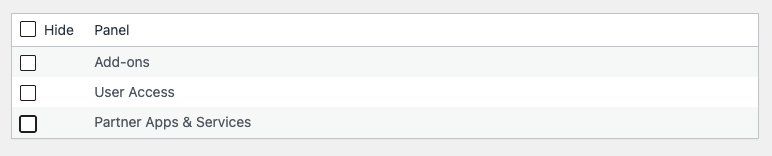
Check the box of the menu item or items you wish to remove and save your settings. The change will take place immediately. Your client’s admin users will no longer see any menu choice you elected to hide.
Additional Ways to White Label WordPress
White Label has more features to help you customize the WordPress admin interface for your clients. In addition to Ninja Forms features, White Label lets you adjust sections of WordPress Core and additional third-party plugins like Elementor and Yoast SEO. Read more about these features by visiting our documentation.