How to White Label Ninja Forms
One of the most popular form-building plugins in the WordPress ecosystem is Ninja Forms. It’s easy to use, so clients love it, and developers like how simple it is to support. Its quality is in line with some of the major competitors in the market. Of course, not every client situation is the same. Sometimes you need to tweak the Ninja Forms experience for particular users. Thankfully, our White Label WordPress plugin is here to help. This article will teach you the ways that you can use our plugin to white label Ninja Forms.
Our White Label Plugin
Let’s stop for a second to discuss the White Label plugin. Our plugin was made to help you modify and customize the WordPress admin experience for your clients. There are tons of features in White Label to help you adjust the WordPress admin. For example, White Label gives you the ability to rebrand the WordPress login screen. You can rename menu items. Remove dashboard widgets or create your own dashboard experience from scratch. There are even features to help you control how plugins and themes are displayed inside of WordPress.
Review our features and our extensive documentation on the site to learn more about White Label. It’s our opinion that it is the best white label WordPress plugin out there. It’s easy and simple to use and makes a great addition to your WordPress development toolset.
Now, back to what we came to discuss: how to white label Ninja Forms.
White Label has a section entirely devoted to Ninja Forms. These features, in combination with other features in White Label, will give you total control over Ninja Forms and its interface. In this post, we will discuss each feature separately.
Note: Many of the features discussed in this article are only found in White Label Pro. You’ll have to purchase that version of our plugin to have access to some of the features related to white labeling Ninja Forms.
Ninja Forms Branding
White Label has a set of features to let you modify and remove Ninja Forms branding from the WordPress admin.
Hide the Ninja Forms Logo
The simplest way to white label Ninja Forms is to hide its logo inside the WordPress admin. You can easily hide the Ninja Forms logo by simply clicking a checkbox inside White Label.

Replace the Ninja Forms Name
In addition to the logo, White Label lets you change the name of Ninja Forms as it shows up on various areas of the WordPress admin. Simply set your own text in White Label’s Ninja Forms Branding feature set.

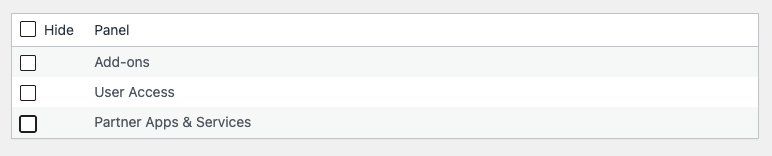
White Label lets you remove the following items from the Ninja Forms dashboard menu:
- Add-ons
- User Access
- Partner Apps & Services
You can hide these links by checking the corresponding boxes in the Dashboard Menu area of our plugin. Once your settings are saved, the selected menu items will no longer display when visitors load the Dashboard area of Ninja Forms.
Ninja Forms Promotions and Notifications
Ninja Forms is a freemium plugin and that comes with a series of interface elements to help them promote their business and offerings. White Label lets you remove Ninja Forms promotions and notifications from the WordPress admin to create a cleaner and less cluttered experience for your clients.
Hide Ninja Forms Promotions
Ninja Forms does contain upsells and ads inside its interface. You can remove these by checking the Hide Promotions checkbox in White Label’s settings. The promotional elements will be removed immediately.

Hide Ninja Forms Notifications
You can disable notifications and update nags from appearing in WordPress by checking the Hide Notifications box in White Label’s settings for Ninja Forms.

Ninja Forms Plugin Details
One of White Label’s most popular features is the ability to hide and rename plugin details. You can hide WordPress plugins from your users with a single click. All you have to do is find the plugin you want to hide on the list inside White Label’s Plugins tab. Check the corresponding box, and you’re done.
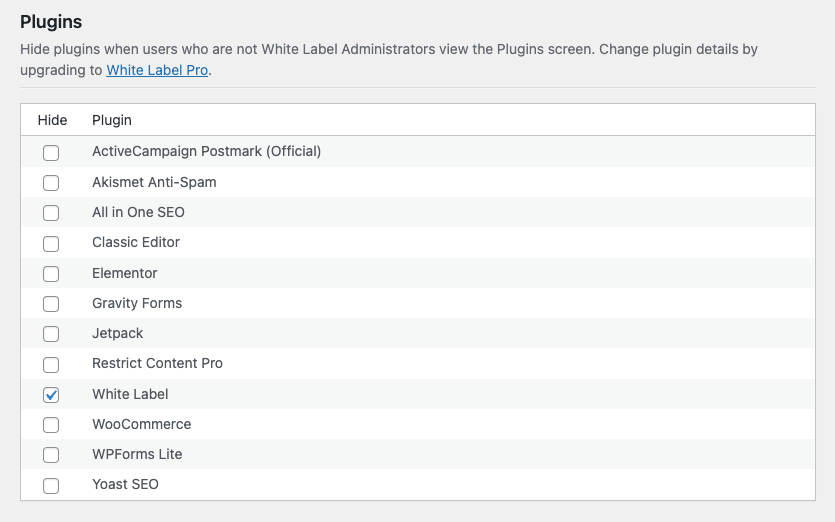
The selected plugins will be immediately hidden from view when a client visits the WordPress admin’s Plugins screen. Additionally, those clients won’t be notified or bothered whenever your selected plugins have updates.
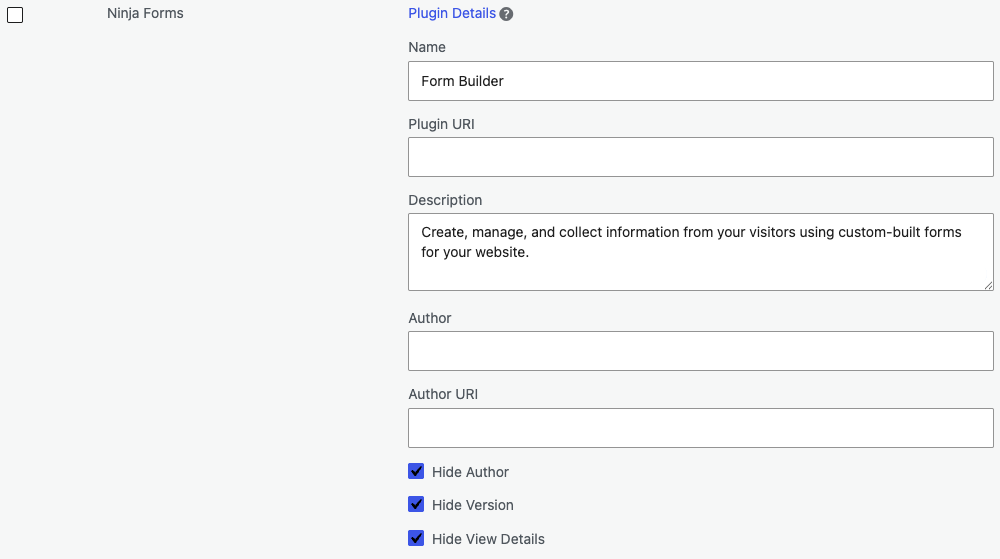
White Label Pro, the premium version of our plugin that is required to access its Ninja Forms features, lets you change WordPress plugin details. This is a great way to take your white labeling of Ninja Forms up a notch. White Label Pro lets you change the following items that are shown on the Plugins screen of the WordPress admin:
- Name
- Plugin URI
- Description
- Author
- Author URI
The following plugin details can be hidden:
- View Details
- Author
- Version
Here’s an example of how you could modify the Ninja Forms plugin details using our plugin:
This is what your users would see with the above settings in place:

Finally, let’s close this post by explaining how to change Ninja Forms menu items in the WordPress admin. White Label has a built-in feature that lets you hide WordPress admin menus from your clients. The interface for this is simple. Choose the menu items to hide, check the box next to them, and save your settings.
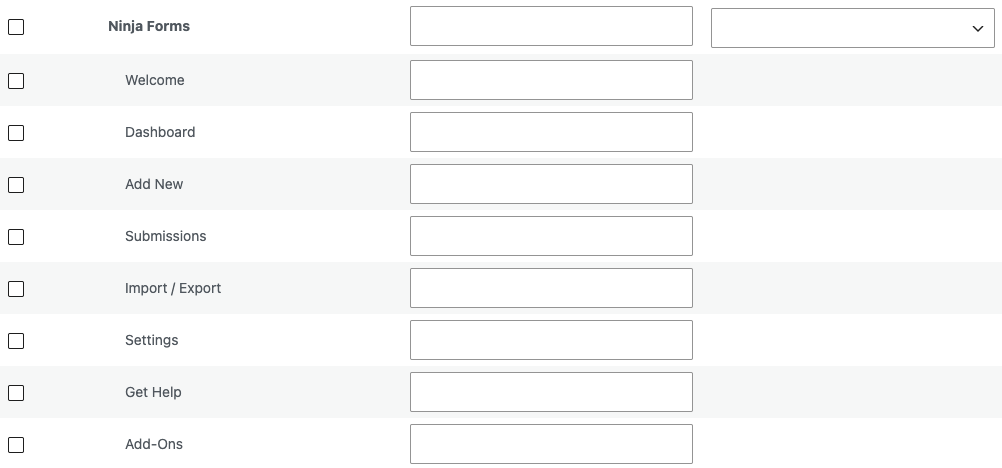
For Ninja Forms, we recommend hiding:
- Settings
- Get Help
- Add-Ons
These are the three interfaces within Ninja Forms that provide the most outside access and obvious branding.
White Label Pro, required for many of these Ninja Forms white labeling features, also lets you rename WordPress admin menus and change WordPress admin menu icons.
White Label Ninja Forms with Our Plugin
That’s the conclusion of our article on how to white label Ninja Forms. You can get started with White Label, for free, right now. It’s easy to install and provides many great features right out of the box. Upgrade to White Label Pro if you’d like to access the Ninja Forms features reviewed in this article.
Our plugin is the best way to modify the WordPress experience for your clients. Use it to keep the WordPress admin clean, simple, and easy to use. White Label will help you cut down on support requests from clients. It makes troubleshooting problems easier by simplifying what clients have access to. It’s a great plugin for WordPress developers and agencies.
Related Posts from Our WordPress Blog

Check out our three reasons why you should use a content management system in your freelancing or agency business.

Learn how to white label Elementor on the WordPress websites you build for your clients. Change branding, menus, interfaces, and more.